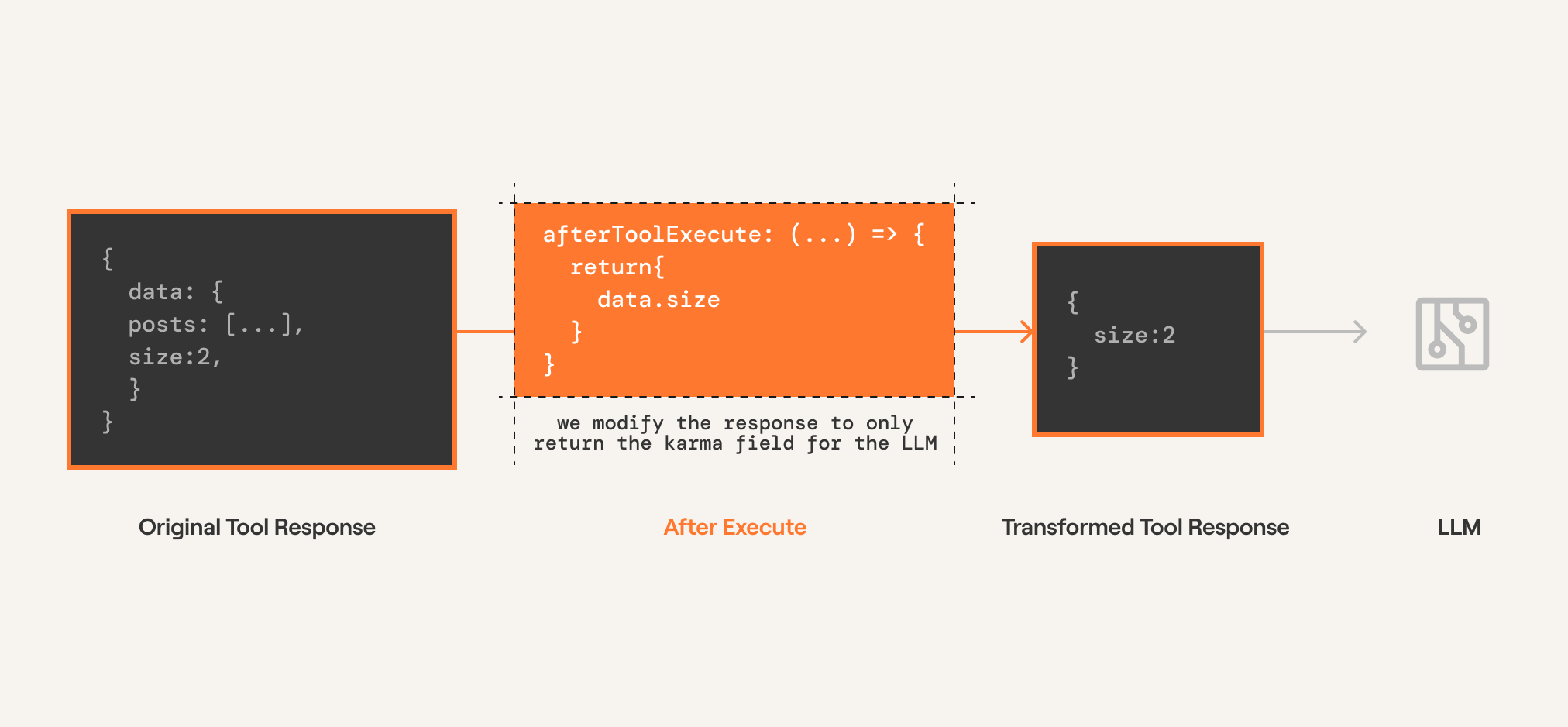
Since completion providers don't have a function execution step, Composio executes the tool call directly. The modifier is configured on the tools.execute method.
from composio import Composio, after_executefrom composio.types import ToolExecutionResponse@after_execute(tools=["HACKERNEWS_GET_USER"])def after_execute_modifier( tool: str, toolkit: str, response: ToolExecutionResponse,) -> ToolExecutionResponse: return { **response, "data": { "karma": response["data"]["karma"], }, }tools = composio.tools.get(user_id=user_id, slug="HACKERNEWS_GET_USER")# Get response from the LLMresponse = openai_client.chat.completions.create( model="gpt-4o-mini", tools=tools, messages=messages,)print(response)# Execute the function callsresult = composio.provider.handle_tool_calls( response=response, user_id="default", modifiers=[ after_execute_modifier, ])print(result)
The `console` module provides a simple debugging console that is similar to the
JavaScript console mechanism provided by web browsers.
The module exports two specific components:
* A `Console` class with methods such as `console.log()`, `console.error()` and `console.warn()` that can be used to write to any Node.js stream.
* A global `console` instance configured to write to [`process.stdout`](https://nodejs.org/docs/latest-v24.x/api/process.html#processstdout) and
[`process.stderr`](https://nodejs.org/docs/latest-v24.x/api/process.html#processstderr). The global `console` can be used without importing the `node:console` module.
_**Warning**_: The global console object's methods are neither consistently
synchronous like the browser APIs they resemble, nor are they consistently
asynchronous like all other Node.js streams. See the [`note on process I/O`](https://nodejs.org/docs/latest-v24.x/api/process.html#a-note-on-process-io) for
more information.
Example using the global `console`:
```js
console.log('hello world');
// Prints: hello world, to stdout
console.log('hello %s', 'world');
// Prints: hello world, to stdout
console.error(new Error('Whoops, something bad happened'));
// Prints error message and stack trace to stderr:
// Error: Whoops, something bad happened
// at [eval]:5:15
// at Script.runInThisContext (node:vm:132:18)
// at Object.runInThisContext (node:vm:309:38)
// at node:internal/process/execution:77:19
// at [eval]-wrapper:6:22
// at evalScript (node:internal/process/execution:76:60)
// at node:internal/main/eval_string:23:3
const name = 'Will Robinson';
console.warn(`Danger ${name}! Danger!`);
// Prints: Danger Will Robinson! Danger!, to stderr
```
Example using the `Console` class:
```js
const out = getStreamSomehow();
const err = getStreamSomehow();
const myConsole = new console.Console(out, err);
myConsole.log('hello world');
// Prints: hello world, to out
myConsole.log('hello %s', 'world');
// Prints: hello world, to out
myConsole.error(new Error('Whoops, something bad happened'));
// Prints: [Error: Whoops, something bad happened], to err
const name = 'Will Robinson';
myConsole.warn(`Danger ${name}! Danger!`);
// Prints: Danger Will Robinson! Danger!, to err
```
Prints to `stdout` with newline. Multiple arguments can be passed, with the
first used as the primary message and all additional used as substitution
values similar to [`printf(3)`](http://man7.org/linux/man-pages/man3/printf.3.html)
(the arguments are all passed to [`util.format()`](https://nodejs.org/docs/latest-v24.x/api/util.html#utilformatformat-args)).
```js
const count = 5;
console.log('count: %d', count);
// Prints: count: 5, to stdout
console.log('count:', count);
// Prints: count: 5, to stdout
```
See [`util.format()`](https://nodejs.org/docs/latest-v24.x/api/util.html#utilformatformat-args) for more information.
Converts a JavaScript Object Notation (JSON) string into an object.
@paramtext A valid JSON string.@paramreviver A function that transforms the results. This function is called for each member of the object.
If a member contains nested objects, the nested objects are transformed before the parent object is.@throws{SyntaxError} If `text` is not valid JSON.
parse(const toolArgs: anytoolArgs), }, {
afterExecute: ({ toolSlug, toolkitSlug, result }: { toolSlug: any; toolkitSlug: any; result: any;}) => any
The `console` module provides a simple debugging console that is similar to the
JavaScript console mechanism provided by web browsers.
The module exports two specific components:
* A `Console` class with methods such as `console.log()`, `console.error()` and `console.warn()` that can be used to write to any Node.js stream.
* A global `console` instance configured to write to [`process.stdout`](https://nodejs.org/docs/latest-v24.x/api/process.html#processstdout) and
[`process.stderr`](https://nodejs.org/docs/latest-v24.x/api/process.html#processstderr). The global `console` can be used without importing the `node:console` module.
_**Warning**_: The global console object's methods are neither consistently
synchronous like the browser APIs they resemble, nor are they consistently
asynchronous like all other Node.js streams. See the [`note on process I/O`](https://nodejs.org/docs/latest-v24.x/api/process.html#a-note-on-process-io) for
more information.
Example using the global `console`:
```js
console.log('hello world');
// Prints: hello world, to stdout
console.log('hello %s', 'world');
// Prints: hello world, to stdout
console.error(new Error('Whoops, something bad happened'));
// Prints error message and stack trace to stderr:
// Error: Whoops, something bad happened
// at [eval]:5:15
// at Script.runInThisContext (node:vm:132:18)
// at Object.runInThisContext (node:vm:309:38)
// at node:internal/process/execution:77:19
// at [eval]-wrapper:6:22
// at evalScript (node:internal/process/execution:76:60)
// at node:internal/main/eval_string:23:3
const name = 'Will Robinson';
console.warn(`Danger ${name}! Danger!`);
// Prints: Danger Will Robinson! Danger!, to stderr
```
Example using the `Console` class:
```js
const out = getStreamSomehow();
const err = getStreamSomehow();
const myConsole = new console.Console(out, err);
myConsole.log('hello world');
// Prints: hello world, to out
myConsole.log('hello %s', 'world');
// Prints: hello world, to out
myConsole.error(new Error('Whoops, something bad happened'));
// Prints: [Error: Whoops, something bad happened], to err
const name = 'Will Robinson';
myConsole.warn(`Danger ${name}! Danger!`);
// Prints: Danger Will Robinson! Danger!, to err
```
Prints to `stdout` with newline. Multiple arguments can be passed, with the
first used as the primary message and all additional used as substitution
values similar to [`printf(3)`](http://man7.org/linux/man-pages/man3/printf.3.html)
(the arguments are all passed to [`util.format()`](https://nodejs.org/docs/latest-v24.x/api/util.html#utilformatformat-args)).
```js
const count = 5;
console.log('count: %d', count);
// Prints: count: 5, to stdout
console.log('count:', count);
// Prints: count: 5, to stdout
```
See [`util.format()`](https://nodejs.org/docs/latest-v24.x/api/util.html#utilformatformat-args) for more information.
@sincev0.1.100
log(var JSON: JSON
An intrinsic object that provides functions to convert JavaScript values to and from the JavaScript Object Notation (JSON) format.
Converts a JavaScript value to a JavaScript Object Notation (JSON) string.
@paramvalue A JavaScript value, usually an object or array, to be converted.@paramreplacer An array of strings and numbers that acts as an approved list for selecting the object properties that will be stringified.@paramspace Adds indentation, white space, and line break characters to the return-value JSON text to make it easier to read.@throws{TypeError} If a circular reference or a BigInt value is found.
Agentic providers have a function execution step. The modifier is configured on the tools.get method which modifies the execution logic within the framework.
Creates a new instance of the Composio SDK.
The constructor initializes the SDK with the provided configuration options,
sets up the API client, and initializes all core models (tools, toolkits, etc.).
@paramconfig - Configuration options for the Composio SDK@paramconfig.apiKey - The API key for authenticating with the Composio API@paramconfig.baseURL - The base URL for the Composio API (defaults to production URL)@paramconfig.allowTracking - Whether to allow anonymous usage analytics@paramconfig.provider - The provider to use for this Composio instance (defaults to OpenAIProvider)@example```typescript
// Initialize with default configuration
const composio = new Composio();
// Initialize with custom API key and base URL
const composio = new Composio({
apiKey: 'your-api-key',
baseURL: 'https://api.composio.dev'
});
// Initialize with custom provider
const composio = new Composio({
apiKey: 'your-api-key',
provider: new CustomProvider()
});
```
Composio({apiKey?: string | null | undefined
The API key for the Composio API.
@example'sk-1234567890'
apiKey: var process: NodeJS.Processprocess.NodeJS.Process.env: NodeJS.ProcessEnv
The `process.env` property returns an object containing the user environment.
See [`environ(7)`](http://man7.org/linux/man-pages/man7/environ.7.html).
An example of this object looks like:
```js
{
TERM: 'xterm-256color',
SHELL: '/usr/local/bin/bash',
USER: 'maciej',
PATH: '~/.bin/:/usr/bin:/bin:/usr/sbin:/sbin:/usr/local/bin',
PWD: '/Users/maciej',
EDITOR: 'vim',
SHLVL: '1',
HOME: '/Users/maciej',
LOGNAME: 'maciej',
_: '/usr/local/bin/node'
}
```
It is possible to modify this object, but such modifications will not be
reflected outside the Node.js process, or (unless explicitly requested)
to other `Worker` threads.
In other words, the following example would not work:
```bash
node -e 'process.env.foo = "bar"' && echo $foo
```
While the following will:
```js
import { env } from 'node:process';
env.foo = 'bar';
console.log(env.foo);
```
Assigning a property on `process.env` will implicitly convert the value
to a string. **This behavior is deprecated.** Future versions of Node.js may
throw an error when the value is not a string, number, or boolean.
```js
import { env } from 'node:process';
env.test = null;
console.log(env.test);
// => 'null'
env.test = undefined;
console.log(env.test);
// => 'undefined'
```
Use `delete` to delete a property from `process.env`.
```js
import { env } from 'node:process';
env.TEST = 1;
delete env.TEST;
console.log(env.TEST);
// => undefined
```
On Windows operating systems, environment variables are case-insensitive.
```js
import { env } from 'node:process';
env.TEST = 1;
console.log(env.test);
// => 1
```
Unless explicitly specified when creating a `Worker` instance,
each `Worker` thread has its own copy of `process.env`, based on its
parent thread's `process.env`, or whatever was specified as the `env` option
to the `Worker` constructor. Changes to `process.env` will not be visible
across `Worker` threads, and only the main thread can make changes that
are visible to the operating system or to native add-ons. On Windows, a copy of `process.env` on a `Worker` instance operates in a case-sensitive manner
unlike the main thread.
The tool provider to use for this Composio instance.
@examplenew OpenAIProvider()
provider: new
new VercelProvider({ strict }?: { strict?: boolean;}): VercelProvider
Creates a new instance of the VercelProvider.
This provider enables integration with the Vercel AI SDK,
allowing Composio tools to be used with Vercel AI applications.
@example```typescript
// Initialize the Vercel provider
const provider = new VercelProvider();
// Use with Composio
const composio = new Composio({
apiKey: 'your-api-key',
provider: new VercelProvider()
});
// Use the provider to wrap tools for Vercel AI SDK
const vercelTools = provider.wrapTools(composioTools, composio.tools.execute);
```
Get a list of tools from Composio based on filters.
This method fetches the tools from the Composio API and wraps them using the provider.
@paramuserId - The user id to get the tools for@paramfilters - The filters to apply when fetching tools@paramoptions - Optional provider options including modifiers@returnsThe wrapped tools collection@example```typescript
// Get tools from the GitHub toolkit
const tools = await composio.tools.get('default', {
toolkits: ['github'],
limit: 10
});
// Get tools with search
const searchTools = await composio.tools.get('default', {
search: 'user',
limit: 10
});
// Get a specific tool by slug
const hackerNewsUserTool = await composio.tools.get('default', 'HACKERNEWS_GET_USER');
// Get a tool with schema modifications
const tool = await composio.tools.get('default', 'GITHUB_GET_REPOS', {
modifySchema: (toolSlug, toolkitSlug, schema) => {
// Customize the tool schema
return {...schema, description: 'Custom description'};
}
});
```
Function to intercept and modify tool execution responses after the tool has executed.
This allows transforming the response or implementing custom error handling.